Photo to Anime AI - Turn Your Photo Into Anime


Drop Files Here (Support JPG & PNG Format Only)

Waiting in queue...

Your request is being processed.

Status: - Queue: -


How to Convert Photo to Anime with One Click

Simply click and your picture will be converted into an anime style. After uploading the photo, it will take almost an instant for the plain photo to be transformed into a colorful anime-style photograph. Our photo to anime converter takes you into a dreamy world of anime art, converting simple landscapes into layers of layered, dynamic scenes and giving every moment a unique vitality and sense of life. Each detail is processed with intelligent algorithms in order to ensure the final result is immersive, as if one were entering another dimension of anime.

Features:
1. 100% free Anime Style Filter
2. Customize image design with prompt
3. No sign-up
4. High speed
5. Unlimited creation
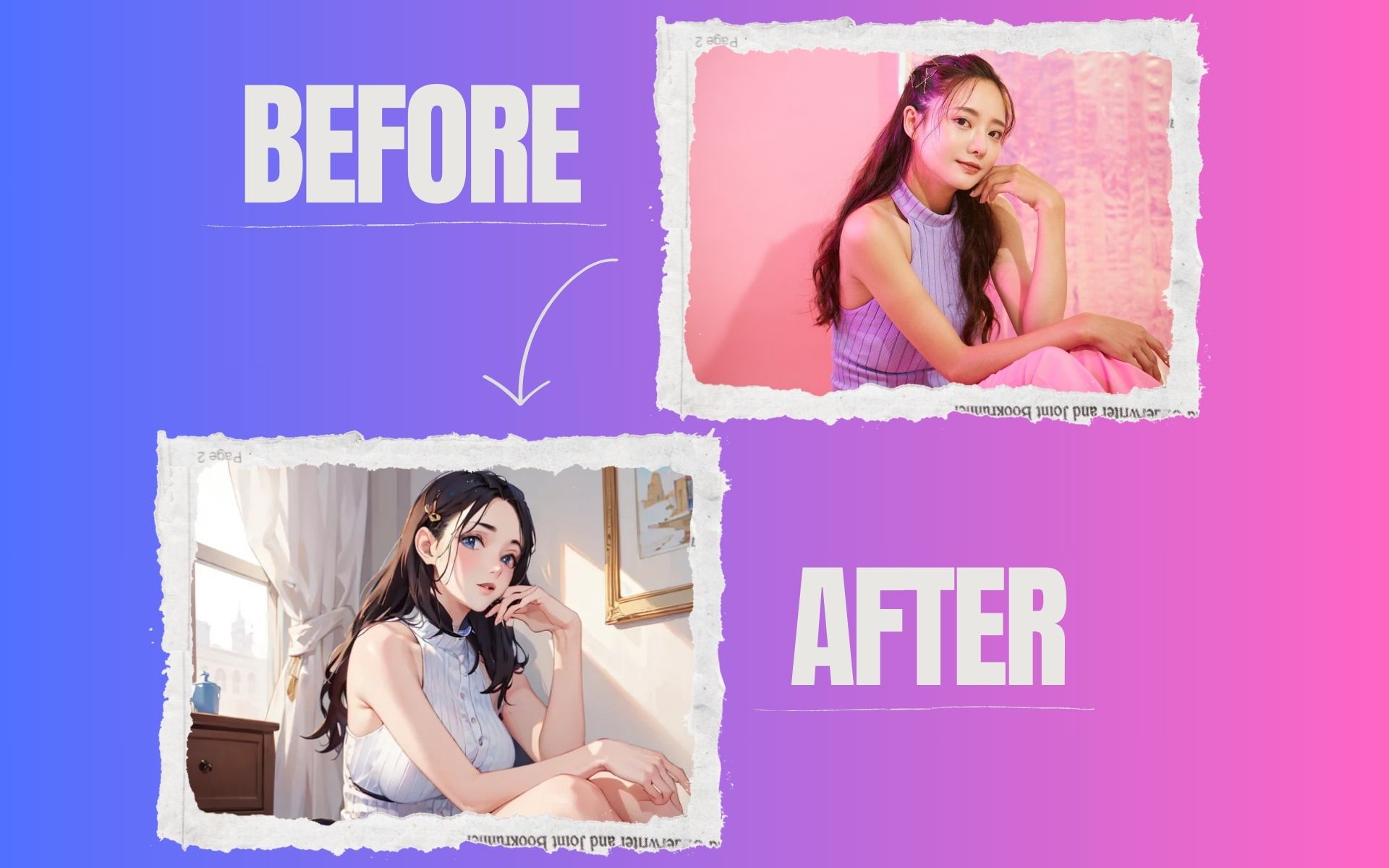

photo to anime

Can I customize the anime style using photo to anime converter?

It is definitely possible to customize the anime style using the photo to anime converter by choosing different models, allowing you to select the style that suits your preferences best.

Is it possible to use the converted anime image commercially?

Yes, as long as you own the copyright for the original image, the generated image can be used commercially after it is converted with the AI convert image to anime generator. As a result, creators have the opportunity to transform their original works into unique anime-style visuals for marketing, merchandise, and more.

Do I need to download software to use the Anime filter?

No, we don't require you to download any software. If you have a browser, you can use our picture to anime converter. It is possible to access the site through a browser on any device, including desktops and mobiles.

Is the photo to anime converter free to use?

It is 100% free to use ToolXOX Photo to Anime Converter. As an additional feature, the image to anime tool allows you to transform or modify your photos into anime pictures in seconds based on the description you provide.

About the Photo to Anime AI

Turn your selfie into an anime character. ToolXoX Photo to Anime AI redraws your portrait with big expressive eyes, clean lines and bright anime colours, perfect for profile pictures, avatars and fan art.

The AI runs on our servers, so it works on any phone or computer without installing an app. It is free to use and you do not need to create an account.

How to Turn a Photo Into Anime

  1. Upload a selfie or portrait.
  2. Click Generate.
  3. Wait for the anime version.
  4. Download and share it.

Features

  • Anime style. Clean lines and bright anime colours.
  • Profile picture ready. Great for Discord, Instagram and gaming.
  • Fast. Results in seconds.
  • No sign up. Use it straight away without an account or login.
  • Works everywhere. Runs online on Android, iPhone, Windows and Mac.

Tips for Better Anime Results

Use a clear, front facing portrait with good light.

Avoid group photos, one face works best.

Glasses and hair partings may change in the anime style. Try another photo if needed.

For a softer painted look, try Photo to Ghibli.

Frequently Asked Questions

Why does the anime version not look like me?

Anime style simplifies features. A sharp, evenly lit photo gives the closest likeness.

Can I use it for pets?

Yes. Pets and objects also work, but faces give the most typical anime look.

Can I use it as a profile picture?

Yes. Download it and crop it to a circle with Crop Circle.

Is the Photo to Anime AI free?

Yes. You can use it for free without signing up.

Does it work on my phone?

Yes. It works in any modern mobile or desktop browser, so there is nothing to install.